
Troubleshooting Invoice Reminders not sending
Automated Invoice Reminders is a feature available on some plans. Ensure you are on an appropriate plan and everything has been set up before continuing.
How to check what invoice reminders were sent
You can review the invoice reminders that have been sent for any time period by using the Debt Management -> Invoice Reminder Logs report. Simply choose a date and all reminders sent out on that date will be displayed. This will also show you which rule/schedule caused the invoice reminder to be sent.
Troubleshooting invoice reminder not sent
1. Checking which rule is used for this invoice
To find the problem you must first pick an invoice you think should have been sent that hasn't been sent. For example "i think more reminders should have gone out" is a good starting point, but you need to find a specific invoice so we can work out the problem. One is enough, you don't need a comprehensive list.
- Find the invoice in The BOS. You can do this from many reports including mega report, unpaid invoices report, or just searching for the invoice using the quick search functionality. Click on the invoice to open the invoice sidebar.
- Check the Reminder Rule shows the rule you expect it to match.
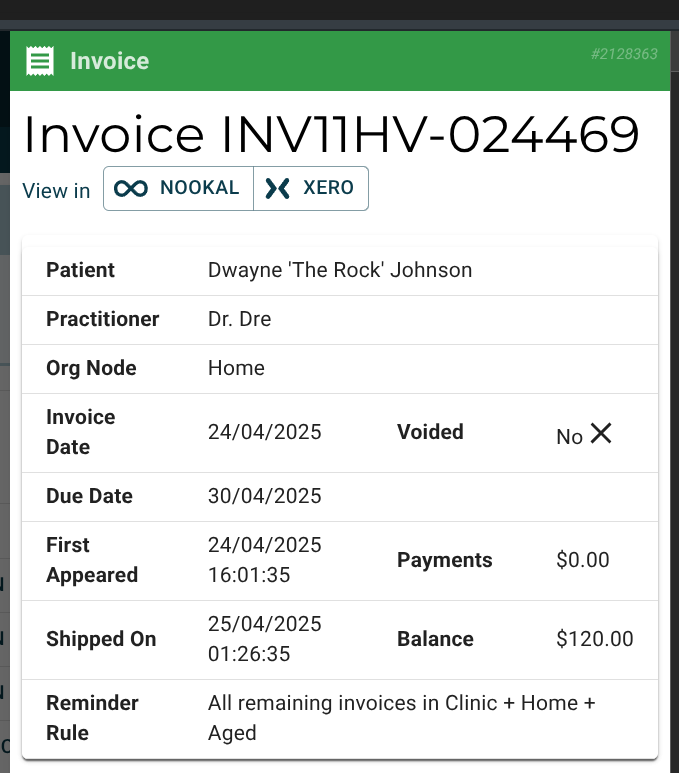
If this is correct, then move on to the next step.
If this is showing no rule, or a different rule then that means you have set up your rules incorrectly. For example you might have a "All DVA Invoices" rule that finds all DVA invoices, but if there is a "All Invoices" rule set up above it then every invoice will match to "All Invoices" with nothing left for the DVA rule.
Reconfigure your rules then use the invoice sidebar to check that the correct rule is now matching.
2. Check the schedules on the rule
Each invoice matches to the first matching rule. This rule can have multiple schedules. For example "1 day overdue" with a second schedule for "14 days" overdue.
Go to Debt Management -> Invoice Settings and select the appropriate rule from above.