Understanding Expenses and Wages in TheBOS
Expenses
- Expenses are journal entries collected from the chart of accounts in your accounting software (Xero). This means it maps directly to your P&L.
- You can categorise expenses in
Tenant settings=>Categorisations=>Expensesso that expenses can be broken down by category on Mega Report. - Expense
Tracking Categoryin Xero maps toOrg Node(Location) in The BOS - This allows you to show expenses for a location to certain staff (EG: Practice Managers) without giving them access to see expenses for other locations or any access to Xero directly.
Limitations
- This cannot be broken down into individual team members salaries because they are Journal Entries not Payslips.
- Therefore cannot be linked to individual service or appointment expenses
See screenshots below
Wage Expenses
- Uses Practitioners' payslips and time sheets to calculate total wage expenses for a time period.
- If a source of pay can't be linked to an exact day, it is distributed across all work days. This won't have an impact if the report interval matches the pay run periods.
- This only includes employees that directly provide services.
- Includes Super Guarantee Contributions, allowances, and leave.
Please note: that this data will remain blank until payruns are posted as it relies on the information generated by timesheets and payruns.

Wage Expense (Ex Leave)
- Same as above but excludes leave.
Wage Expense as % of Revenue
- Simply Wage expense divided by revenue items attributed to the same provider.
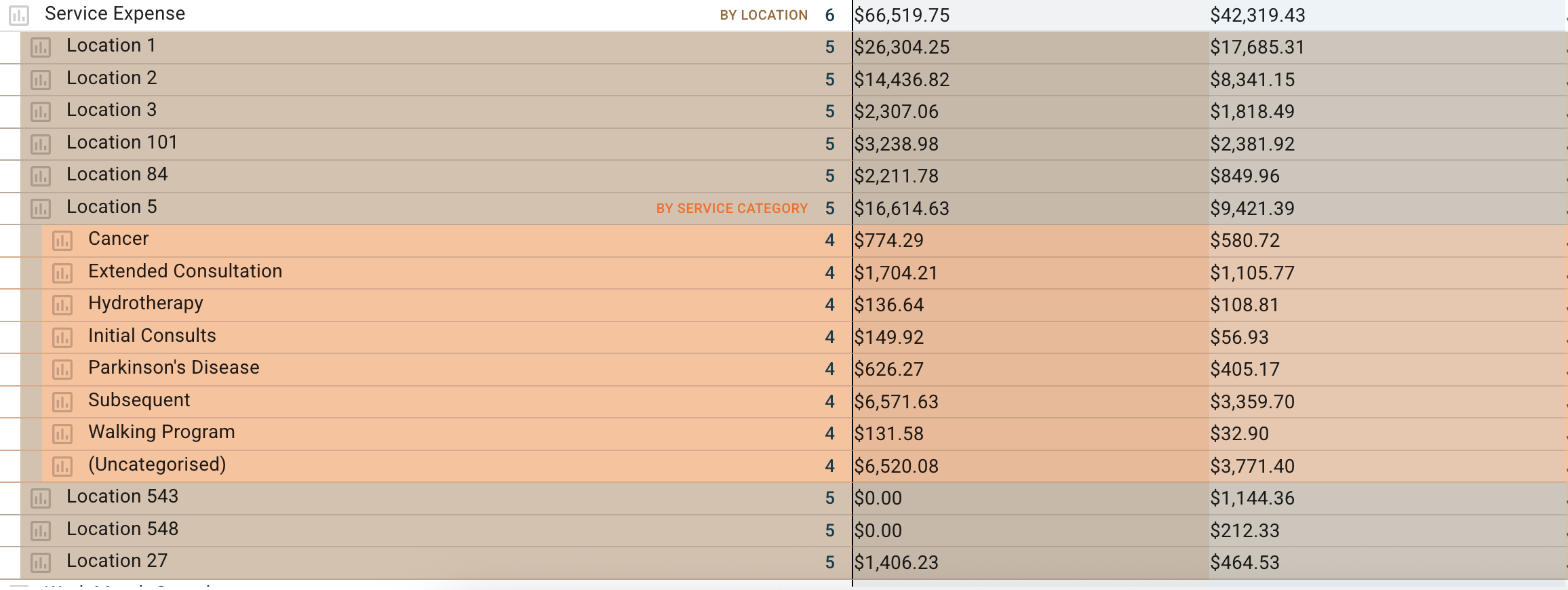
Service Expense
- Service expense is the direct cost of the practitioners hourly rate attributed to that service.
- The BOS finds the practitioner for the services and maps their ordinary hourly rate applying this to the service.
Note: This ignores any un-utilised time an is only referring to the exact time needed to provide the service.